DFS
How to export your DraftKings or FanDuel salary file
The optimizer's slate mode needs one file: the salary export your site already gives you. On both DraftKings and FanDuel it is one click, you never edit it, and it never leaves your machine — the parsing and the solve both happen in your browser.
Open any classic contest on the slate you want to build for
On DraftKings, click into a classic contest and then into its draft screen — the one with the player list on the left and your empty lineup on the right. You do not have to enter the contest, pay anything, or finish a lineup. The draft screen is only where the export control lives; the file it hands you describes the whole slate, so any classic contest on that slate gives you the same salaries.
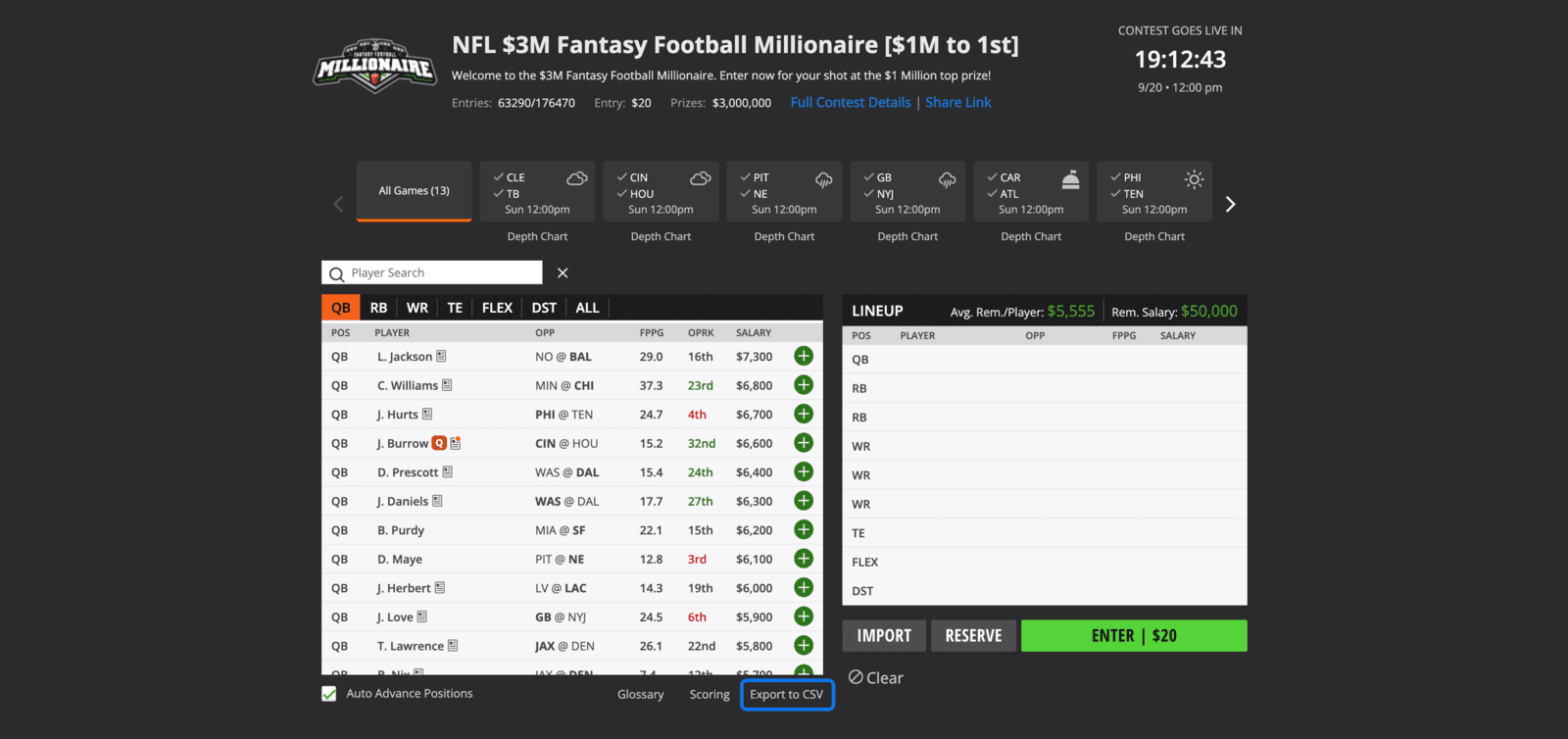
The draft screen. The control you want is at the bottom, ringed in blue. Click "Export to CSV" under the player list
It sits in the dark bar along the bottom of the player list, to the right of Glossary and Scoring. One click downloads the file — there is no dialog and nothing to configure.

Bottom-right of the player list, past Glossary and Scoring. Load that file into the optimizer, unedited
The download lands in your downloads folder as DKSalaries.csv. Back here, in slate mode, leave the site set to DraftKings classic and load it. Load it as it downloaded — there is nothing in it you need to edit, and a spreadsheet round-trip can change the file enough to get it refused. Once this week's projections have posted, we attach them to the skill positions, default every team defense to an editable punt, and the pool appears.
DraftKings showdown
To build for one game, export from a showdown contest instead of a classic one, and set the site control to DraftKings showdown before you load the file. That file lists every player twice, once as CPT and once as FLEX, each with its own salary, and it includes kickers.
What's in the DraftKings file
A real Week 3 classic export carried 670 players — the quarterbacks, running backs, receivers, tight ends and team defenses DraftKings listed for that slate, each with the salary DraftKings set for it. Salary is the only number we take from the file. The projections are ours.
- Name
- who the player is — never the "Name + ID" column beside it
- ID
- DraftKings' own id for that player, kept so two players with one name never merge
- Position
- QB, RB, WR, TE or DST — plus K on a showdown file
- Salary
- what the player costs against the slate's cap — $50,000 on DraftKings classic
- TeamAbbrev
- the player's team
What we ignore
Everything else in the header: "Name + ID", which duplicates Name for DraftKings' own import screen, plus Game Info, AvgPointsPerGame and Status. Roster Position we read only for CPT and FLEX: CPT rows mark a showdown file and carry each captain's price. DraftKings can add columns — Status was not there when we wrote the parser — and an unfamiliar column has never been a reason to refuse a file.
If the upload is refused
- "Missing required columns"
- Check the site control first — a FanDuel file loaded as DraftKings classic fails exactly this way, and so does the reverse; the message lists the columns the site you picked expects, not the ones your file carries. If the site was right, the file is not the salary export, or it was edited and re-saved. Download a fresh one and load it as it came.
- "That file has a header but no data rows"
- The download did not finish, or a spreadsheet saved an empty sheet over it. Download it again.
- A player I expected is in Unmatched players, not the pool
- That is expected, and it is not an error. We project the skill positions for the current week; anyone we cannot match by name, team and position is listed under Unmatched players so you can type a projection in or drop them, and no player is ever silently discarded. Team defenses (and kickers, on showdown) never appear there — they are never projected at all, and every one carries the same flat punt value, which is why the optimizer separates defenses by salary alone.
- The slate looks wrong
- The export describes the slate of the contest you took it from. A Sunday-only file and a full-week file are different slates; take the export from a contest on the slate you actually mean to play.
FanDuel
Same three steps, one different control. Open a FanDuel contest on the slate you want and its Available players panel carries a "Download players list" link at the top right — beside the heading, not under the list the way DraftKings' sits. One click downloads it, under a long name carrying the date and the slate's own id rather than a fixed one. Back here, switch the site control to FanDuel classic before you load the file, and leave the file as it came.

What we read from the FanDuel file
A real Week 3 FanDuel players list carried 652 players. FanDuel splits the name across two columns and writes D for a team defense, so the six columns we read there are not the five we read from a DraftKings classic file:
- Id
- FanDuel's own id for that player
- Position
- QB, RB, WR, TE or D — FanDuel writes D for a defense
- First Name
- half the name; FanDuel has no single name column
- Last Name
- the other half — never the Nickname column between them
- Salary
- what the player costs against the slate's cap — $60,000 on FanDuel classic
- Team
- the player's team